Development and Publication of Marketplace Packages¤
Introduction¤
Marketplace Packages are archives that bundle content, functionality, and configuration from Corporate Memory for sharing and reuse.
Each package has its own release cycle. Packages can be installed and uninstalled during runtime.
In order to support the development and publication of Marketplace Packages, we published a package-template. Please have a look at this template to get started.
This page gives an overview of the concepts you need to understand in order to develop packages. If you prefer to learn by doing, follow the step-by-step tutorial, which builds a package with a graph and a Build project from scratch.
Package Structure¤
Use the package-template to create the boilerplate for a package repository:
copier copy gh:eccenca/cmem-package-template my-package
The template asks for the following variables:
package_typevocabulary(default) orproject, see Metadata.package_id- Unique package identifier in lowercase letters, numbers, and hyphens (e.g.
eccenca-supply-chain-vocab). package_name- Human-readable package name (3 - 50 characters).
package_description- Short description of the package (10 - 150 characters).
python_dependencies- Comma-separated Python plugin dependencies (only asked for
projectpackages). vocab_dependencies- Comma-separated dependencies on other Marketplace Packages (only asked for
projectpackages). github_page- Optional URL of the package repository, used as the base for icons and the homepage link.
The generated repository has two levels:
the top level holds the generic package repository files (changelog, README, license, CI configuration, and a Taskfile.yaml), while the nested {package_id}/ folder is the package directory - the actual package content plus its manifest.
License¤
No publication without license
Packages without a license declaration cannot be published to a Corporate Memory Marketplace Server.
Our template will bootstrap your package with an Apache License 2.0 (Apache-2.0).
See https://spdx.org/licenses/ if you need a different license.
You can remove a license entirely; however, a package that does not declare a license cannot be published.
Manifest¤
The cpa-manifest.json in the package directory is the central package definition.
It contains all relevant package metadata and describes the package contents.
It is used to present package details and contents to the inspect command, to install, configure and uninstall all parts of a package.
Metadata¤
package_type-
project- A package that may ship any content, mainly intended to contain Build projects, (instance/data) graphs, SHACL shapes, workspace configuration, query catalogs, etc.
vocabulary- A package that is supposed to contribute vocabulary / ontology contents, such as
rdf:,org:,sso:, etc. Such a package may contain multiple vocabularies / ontologies. Packaging related SHACL shapes is reasonable, too.
package_id- Unique package identifier
package_version- Semantic version identifier string of the package, but limited to proper releases.
metadata.name- The package name in English.
metadata.description- The package description in English.
metadata.license- The SPDX license identifier of the package, e.g.
Apache-2.0. metadata.comment- A maintainer or publisher comment.
metadata.agents- Publishers, authors, and contributors of the package.
metadata.urls- Related links, e.g. the homepage or the issue tracker of the package.
metadata.tags- Free-text tags used to categorize the package on a Marketplace Server.
Files¤
A package can contain graphs, Build projects, text files, and images.
These contents are referenced in the files section of the cpa-manifest.json.
Graphs¤
Use the following structure to include a graph.
register_as_vocabulary and import_into are optional instructions.
We suggest to organize graphs in a respective sub-folder (here graphs/), but this is up to you:
"files": [
    …
    {
        "file_type": "graph",
        "file_path": "graphs/file.ttl",
        "graph_iri": "http://www.example.org/file/",
        "register_as_vocabulary": true,
        "import_into": [
            "http://www.example.org/integration_graph/"
        ]
    },
    …
]
Projects¤
Use the following structure to include a project.
We suggest to organize projects in a respective sub-folder (here projects/), but this is up to you:
"files": [
    …
    {
        "file_type": "project",
        "file_path": "projects/my-build-project.zip",
        "project_id": "my-build-project"
    },
    …
]
Texts and Images¤
Text files and images describe the package itself rather than shipping content.
The template declares README.md, CHANGELOG.md, and LICENSE this way; images are used to represent the package on a Marketplace Server:
"files": [
    …
    {
        "file_type": "text",
        "file_path": "README.md",
        "file_role": "readme"
    },
    {
        "file_path": "icon.png",
        "file_type": "image",
        "file_role": "icon"
    },
    …
]
Dependencies¤
Dependencies to other packages or to Python plugins can be declared in the copier copy answers.
The dependencies are added to the cpa-manifest.json as described in the next sections.
Python Plugin Packages¤
Use the following to declare a dependency to a Python plugin:
Marketplace Packages¤
Use the following to declare a dependency to another Marketplace Package:
"dependencies": [
    …
    {
      "dependency_type": "marketplace-package",
      "package_id": "w3c-rdfs-vocab"
    }
    …
]
Package Development Cycle¤
cmemc package reference
The cmemc package command group contains all needed commands to support the complete package lifecycle.
Some packages are simply wrapping existing artifacts into a managed structure (e.g. existing vocabulary/ontology).
Most (solution) package development and evolution will be a back and forth between a package repository (making changes to cpa-manifest.json in terms of adding/removing dependencies, graph files, or Build project files) and a Corporate Memory (package development) instance.
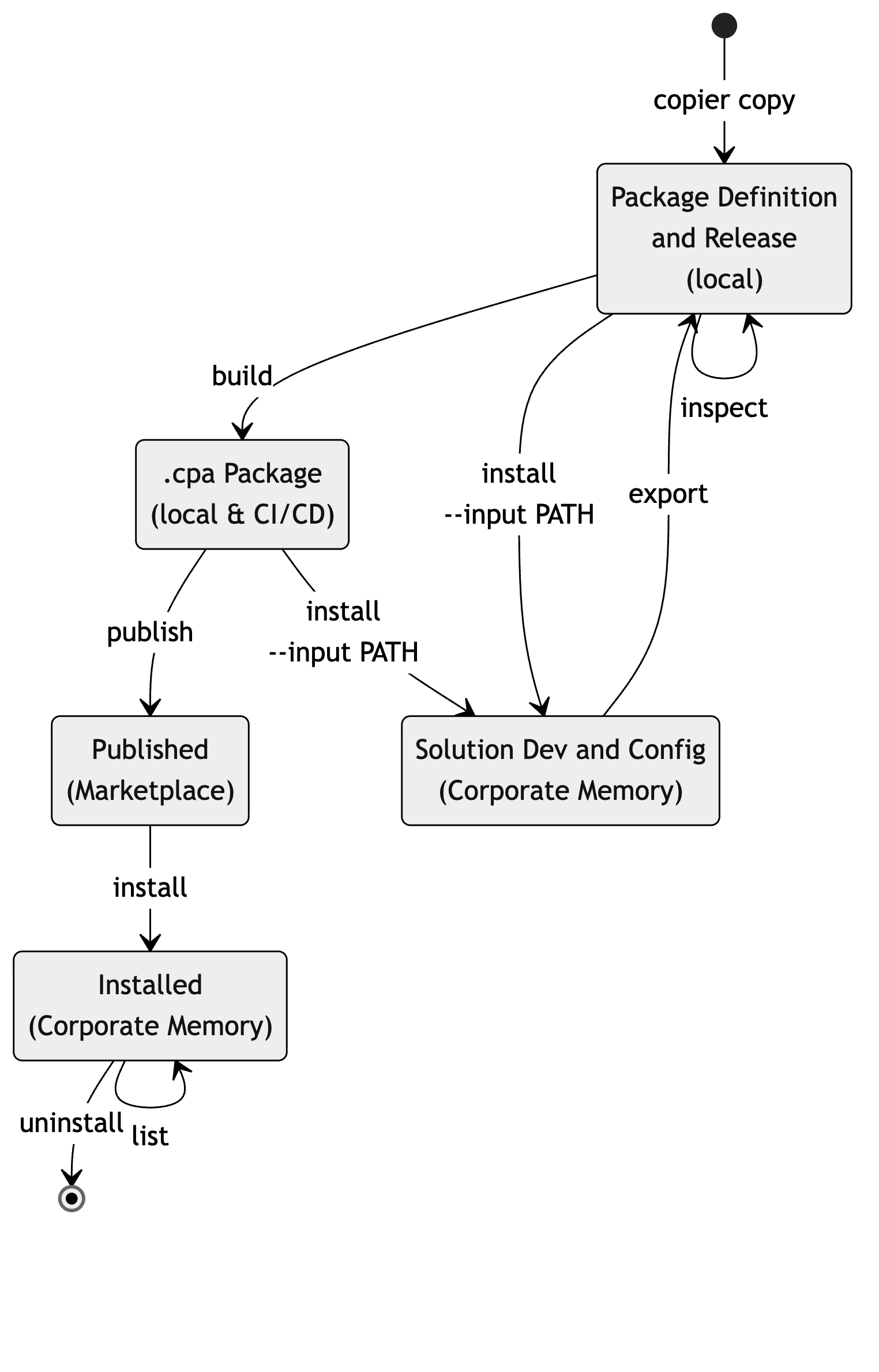
Task wrappers
The generated package repository ships a Taskfile.yaml which wraps the commands below into task import, task export, task build, task check, task delete, and task publish.
The tutorial uses these wrappers.
Install (local) Packages¤
Use the following command to install a local package folder content (or built .cpa file) to a Corporate Memory (package development) instance.
Make changes to graphs, configuration, or Build projects as needed.
Newly created or imported graphs or Build projects need to be registered in cpa-manifest.json so they will be fetched by export.
Export Contents into a Package¤
Use the following command to export the file artifacts declared in cpa-manifest.json from a Corporate Memory (package development) instance to a local package folder.
Run this to initially populate package contents from a solution configuration. You can also use it to update contents after making changes on your Corporate Memory (package development) instance, capturing them for building and releasing as a Marketplace Package.
For version controlled package directories, add --extract to store Build projects as extracted directories instead of ZIP archives (the manifest still references the ZIP; build and install zip it silently).
Inspect Packages¤
Review and verify the contents of a package with the following command:
Build Packages¤
During development you can install a package from a local path (plain folder or a .cpa package) using the cmemc package install --input PATH command.
Use the cmemc package build command.
This will build a package archive from a package directory.
This command processes a package directory, validates its content including the manifest, and creates a versioned Corporate Memory package archive (.cpa) with the following naming convention: {package_id}-v{version}.cpa.
Publish Packages¤
Package archives can be published to the Marketplace Server using the cmemc package publish command.
After being published packages can be found and installed directly from the Marketplace Server (potential users do not need to have the local package folder or .cpa file available).
The published package ID and version are taken from the manifest inside the archive.
Publishing requires a Marketplace account. If you do not provide the credentials, cmemc requests them interactively. For non-interactive use, such as a release pipeline, provide them with the following options or the corresponding environment variables:
| Option | Environment variable | Description |
|---|---|---|
--marketplace-url |
ECCENCA_MARKETPLACE_URL |
Base URL of the Marketplace Server, defaults to https://eccenca.market. |
--marketplace-account |
ECCENCA_MARKETPLACE_ACCOUNT |
The Marketplace account which publishes the package. |
--marketplace-password |
ECCENCA_MARKETPLACE_PASSWORD |
The password of this account. |
Like all cmemc configuration keys, these variables can also be set per connection in your cmemc configuration file.